Print without spaghetti.
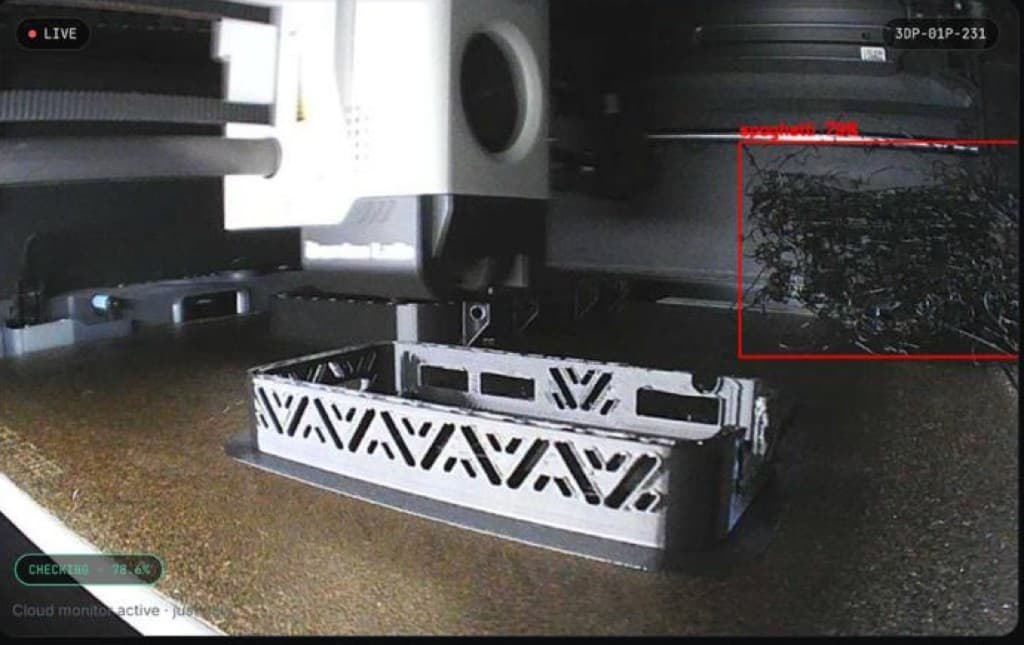
AI-powered spaghetti detection watches your printer camera and alerts you before a failed print wastes hours of filament.
Built to watch every layer
Three systems working together so a failed print never wastes your time or filament again.
AI Detection
Real-time computer vision detects spaghetti printing within seconds, frame by frame, on every layer.
Instant Alerts
Receive notifications immediately when printing fails, so you can act before the spool keeps spinning.
Save Filament
Stop wasting hours of print time and expensive filament on runs that were doomed from layer ten.
From plug-in to peace of mind
Four steps stand between your printer and a monitored, protected print farm.
Connect your printer
Add your 3D printer — native Bambu Lab integration via Bridge, or any printer with a USB camera on the build plate.
Start monitoring
PrintWatch opens a live feed from your camera and begins watching the build plate.
AI analyzes every frame
Our model scores each frame for spaghetti signatures, layer shifts, and adhesion loss.
Print safely
Get alerted the moment something looks wrong — or relax knowing nothing did.
Your entire farm, one screen
Monitor every printer, alert, and hour quota without switching tabs or tools.
Simple plans for every farm
Start free. Upgrade when you need more printers, hours, or pro features.
| Standard | Premium | Premium for Education | Professional / OEM | |
|---|---|---|---|---|
$2.99 per month | Custom | |||
| Printers | 1 | 1-10 | 1-10 | Unlimited |
| Additional Printer Price | N/A | $3 for each additional printer | $2 for each additional printer | Custom |
| AI Detection Hours | 12 hours/month | 100 hours/month | 100 hours/month | Unlimited |
| Additional Hour Price | N/A | $1 for each additional hour | $0.75 for each additional hour | Custom |
| API Access | Limited | ✓ | ✓ | ✓ |
| Model Updates | Limited | ✓ | ✓ | ✓ |
| 24/7 Support | Limited | ✓ | ✓ | ✓ |
| Email Notifications | ✓ | ✓ | ✓ | ✓ |
| Software Updates | ✓ | ✓ | ✓ | ✓ |
| SMS Notifications | ✕ | ✕ | ✕ | ✓ |
Without vs with PrintWatch
Without PrintWatch
- Check the camera every hour
- Find spaghetti after the spool is wasted
- No alerts when you're away
- Manual port forwarding for remote access
With PrintWatch
- AI watches every layer automatically
- Instant alerts on failure detection
- Pause or stop prints remotely
- Secure LAN tunnel — no router changes
Trusted by makers and print farms
Real users saving filament, time, and sanity.
“Saved me dozens of failed prints. It paid for itself in the first week.”
“I never leave my printer unattended anymore — the alerts land before I'd have noticed.”
“Best investment for my print farm. Ten printers, zero babysitting.”
Common questions
What 3D printers are supported?
Does PrintWatch work remotely?
How accurate is the AI detection?
Can I monitor multiple printers?
How do I set up PrintWatch?
Do unused monitoring hours carry over?
Stop babysitting your printer
Connect your first 3D printer in minutes — free plan, no credit card.